How do I import my contacts from the legacy system?
Bring the contacts from your previous BunnyDoc account into the new system in one click, once your legacy account is connected.
Once your legacy account is connected, you can copy your old contacts into the new system without exporting or uploading anything.
You need to connect your legacy account first. The Import contacts box only appears after the connection succeeds.
You can only import once
Importing contacts is a one-time migration. Once it has run, it can't be run again, so make sure you're connected to the right legacy account first.
Import your contacts
- Open Settings and click Legacy Account under Workspace.
- Below the Connected box, find the Import contacts box.
- Click Import contacts.
- Your legacy contacts are imported into your new account.
Check the results
When the import finishes, the Import contacts box shows the date and time it ran and a summary of what happened to each contact:
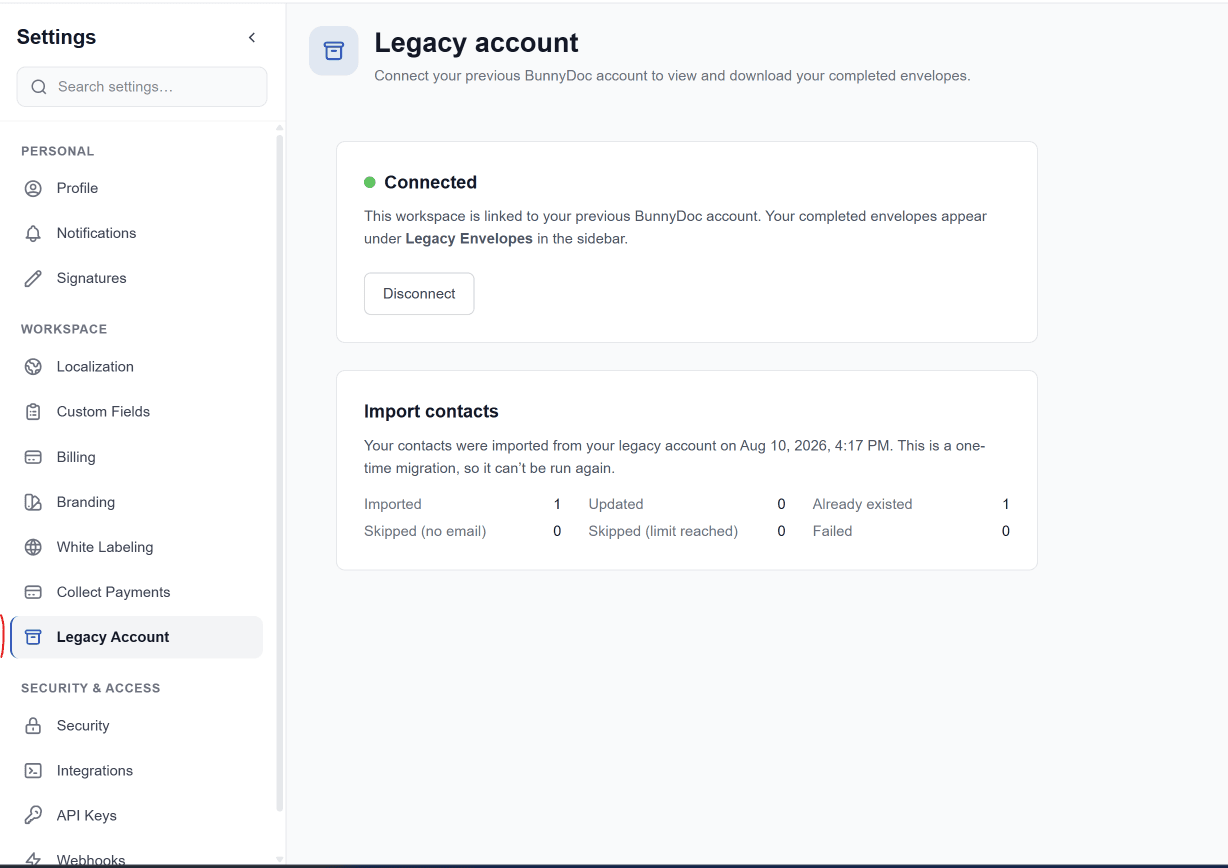
| Result | What it means |
|---|---|
| Imported | New contacts added to your account. |
| Updated | Contacts that were already in the new system, updated with the details from your legacy account. |
| Already existed | Contacts that were already in the new system with nothing to update. |
| Skipped (no email) | Legacy contacts without an email address, which weren't imported. |
| Skipped (limit reached) | Contacts that weren't imported because your plan's contact limit was reached. |
| Failed | Contacts that couldn't be imported because of an error. |
You'll find the imported contacts under Contacts, alongside any contacts you'd already added.
Add the skipped contacts yourself
Because the import can't be run again, add any skipped or failed contacts one by one or with the CSV import wizard.
How do I connect my legacy account?
Create your account on the new BunnyDoc, then link it to your previous BunnyDoc account from Settings → Legacy Account.
How do I find my legacy envelopes?
Open, search, and download the envelopes you completed on the legacy system from Legacy Envelopes in the new BunnyDoc.